
 By Wafa Ali
Are you using Jazz and want to know how to view your active bundles? This easy-to-follow guide will show you different ways to check your Jazz packages and see what’s left in your internet, calls, and messages. These simple methods help you stay updated on your account and manage your resources better.
Check Jazz Packages via Jazz SIMOSA World App
Follow These Steps:
Get the SIMOSA – Jazz World App by visiting Google Play Store or Apple App Store and installing it on your phone.
Log into the app using your Jazz mobile number.
After signing in, the app displays:
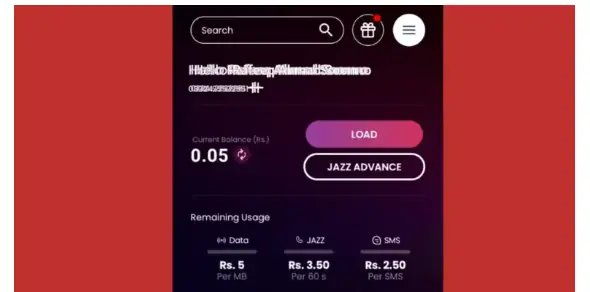
Your active bundles that run daily, weekly, or monthly
How many MBs, call minutes, and SMS you still have
When each bundle will expire
You can also recharge or control your offers right inside the app.
Check Jazz Packages via USSD Codes
Easy Instructions:
Press *443# on your phone to get a full list of what bundles you currently have.
An SMS will arrive showing the name and status of each active offer on your SIM.
Check Remaining Internet MBs
Want to know how much internet is still available on your SIM?
Press *1174# on your dial pad
An SMS will tell you exactly how much data you have left to use.
Check Remaining Minutes
Looking to see how many calling minutes are available for Jazz users and other networks?
Press *110# and send
You’ll get a text message with complete information about your call balance.
Check Remaining SMS
Want to find out how many free text messages you can still send?
Press *1012# from your phone
A message will show up telling you your current SMS balance.
Check Jazz Monthly Package Remaining via USSD Codes
Here you’ll find a full breakdown of Jazz monthly offers with their individual checking codes. Use these codes to quickly view how much internet, calling time, and text messages remain in your monthly bundle. Staying informed about what you’ve used keeps you from running low when you need it most.
| Package Name | Status Code | Type |
|---|---|---|
| *699# Mera Package | *699*2# | Prepaid |
| Monthly WhatsApp Offer | *987*2# | Prepaid |
| Monthly Bachat Offer | *614*2# | Prepaid |
| Monthly YouTube & Social | *620*2# | Prepaid |
| Super Mahana Offer | *529*2# | Prepaid |
| Monthly Max Offer | *708*2# | Prepaid |
| Monthly Freedom Package | *733*2# | Prepaid |
| Monthly X Offer | *7733*2# | Prepaid |
| Gold Basic (Postpaid) | *777*2# | Postpaid |
| All-In-One Mega | *446*2*1*2# | Postpaid |
| Jazz Sim Lagao Offer | *551*2# | Pre/Post |
Check Jazz Weekly Package Remaining via USSD Codes
This section shows all Jazz weekly offers along with the name of each plan and its checking code. These codes let you see your leftover MBs, minutes, and SMS for the entire week. Checking often prevents sudden service stops and keeps you online without losing access to your bundle.
| Package Name | Status Code | Type |
|---|---|---|
| Boltay Jao Offer | *190*2# | Prepaid |
| Haftawaar All Rounder | *747*2# | Prepaid |
| Super Woman Bundle | *117*14*2# | Prepaid |
| Lajawab Haftawar | *565*2# | Prepaid |
| Sindh Haftawar | *406*2# | Prepaid |
| Weekly Premium Plus | *117*47*2# | Prepaid |
| Weekly Freedom | *737*2# | Prepaid |
| Weekly X | *7737*2# | Prepaid |
| Weekly X Plus | *852*2# | Prepaid |
| Super Sim Offer | *476*2# | Prepaid |
Check Jazz Daily Package Remaining via USSD Codes
Below, you’ll see every Jazz daily offer listed with its name and the code to check what’s remaining. This quick process lets you track your usage each day and know exactly how much data, calling time, and messages you have. Frequent monitoring helps you use your resources wisely and prevents unexpected fees.
| Package Name | Status Code | Type |
|---|---|---|
| Punjab Daily Offer | *6000*2# | Prepaid |
| Sindh Daily Offer | *522*2# | Prepaid |
| 3 Day-Max Offer | *631*2# | Prepaid |
| Give-a-Bundle | *919*2# | Prepaid |
| Jazz Apna Shehar Offer | *229*2# | Prepaid |
| Karachi Daily Hybrid Offer | *400*2# | Prepaid |
| Jazz Daily Super Offer | *212*2# | Prepaid |
Check Jazz Packages via SMS
Simple Procedures:
Compose a text message containing the bundle name or your specific question and send it to the relevant service number.
As an example, if you want to view remaining data or bundle information, text specific words to #114# or similar numbers depending on your subscription.
A reply message will arrive with all your package information.
Check Jazz Packages via Customer Care (Helpline)
Quick Directions:
Dial 111 to reach Jazz customer support.
Talk to a representative who can tell you about your active offers, available MBs, minutes, or SMS.
Check Jazz Packages via the Jazz Website
Step-by-Step Information:
Go to the official Jazz website online.
Sign in with your Jazz number if required, or find the area that displays package and balance information.
You can browse available offers and review what’s active on your account along with remaining resources.
What is the Jazz package Status code?
The Jazz package status code is a quick dial code that lets you see everything about your active bundles, such as available data, minutes, and messages. When you dial these special codes, your usage details appear right away without needing to open an app or visit a website.
Why It’s Important to Check Jazz Packages, Remaining MBs, Minutes & SMS
Keeping an eye on your Jazz bundles, available MBs, minutes, and SMS is very important for managing your mobile account properly. Here’s why it matters:
Prevent Unexpected Fees: Watching your usage stops you from paying extra surprise charges.
Pick the Right Bundle: Make sure the offer you’re using fits what you actually need.
Never Lose Connection: Know the right time to reload your data, minutes, or SMS so you stay online.
Control Your Spending: Track what you spend on mobile services and manage your money better.
FAQS
How can I check my Jazz package details?
You can view your active Jazz bundles by pressing *443# from your phone. An SMS will arrive with bundle names, their current status, and when they end. The Jazz World app also displays everything clearly.
How can I check my Jazz remaining package?
Press the checking code that matches your bundle or launch the Jazz World app. Both methods display what’s left in your data, minutes, and SMS quickly.
How do I check my Jazz package status?
To see your current bundle status, press *443# on your keypad. This reveals all active offers and how long they will last.
How can I check my Jazz call package details?
Press *443# to receive a list showing your active calling bundles and their status. An SMS arrives with the bundle information and validity period.
How can I check my Jazz minutes and data?
Press *110# to view your available call minutes. For internet data, press 1174#. Both codes send you an SMS with exact usage details.
How do I check my internet remaining data?
Press 1174# using your Jazz SIM card. Your internet balance arrives via SMS. You can also open the Jazz World app for a complete breakdown.