
 By Wafa Ali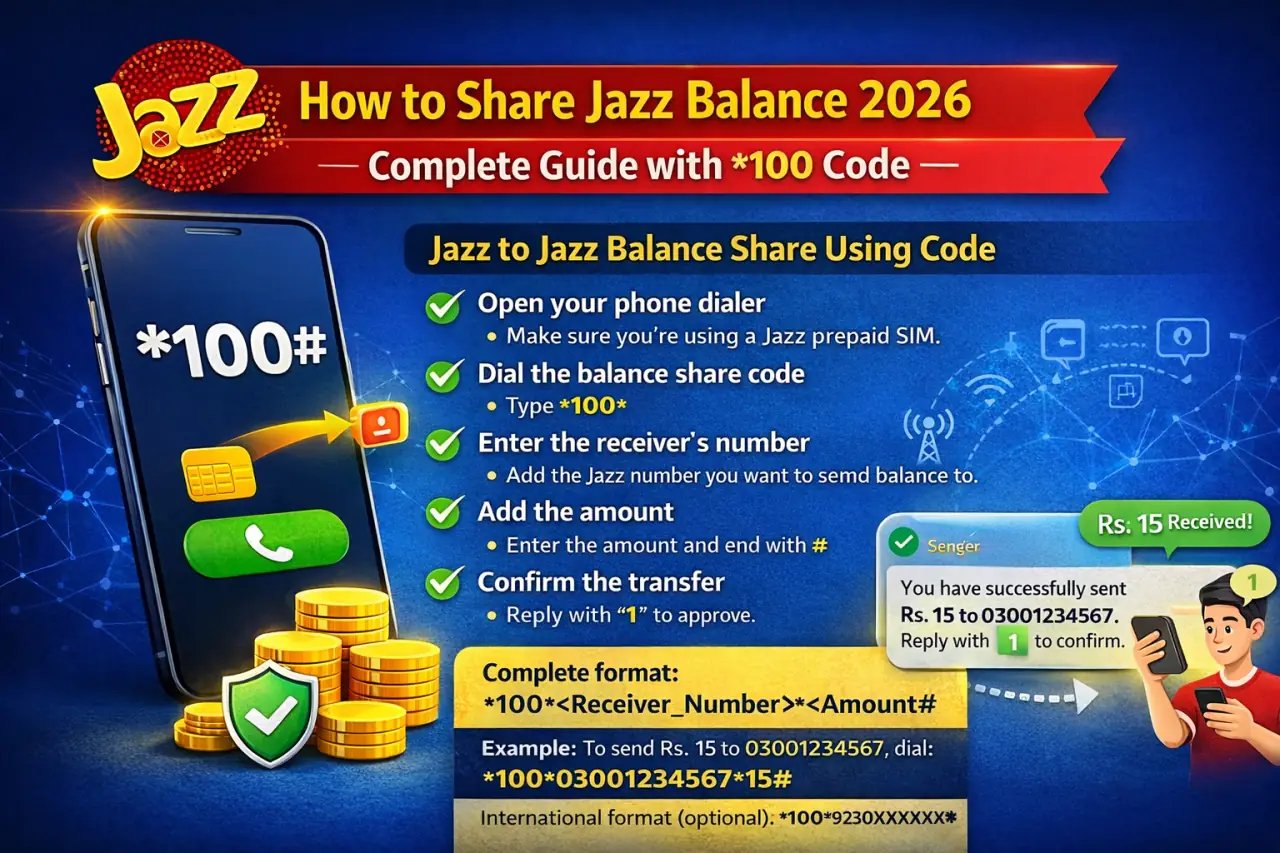
Do you want to transfer your Jazz balance to your friends or family members? If you are searching for How to Share Jazz Balance, Jazz Pakistan’s leading mobile network operator provides a simple and reliable method to send mobile credit anytime. This facility is extremely helpful when someone close to you runs out of balance and urgently needs credit for calls, SMS, or internet activation.
With the Share Jazz Balance service, you can quickly transfer a specific amount to another Jazz number in just a few steps. In this complete guide, we will explain the full procedure, including the official USSD code, transfer limits, service charges, and other important details you should know before making a transaction. We will also cover the balance request option, the use of the Jazz Simosa World application, and clarify whether balance can be transferred to other mobile networks or JazzCash accounts.
Before sharing, many users first check their bundles such as Jazz Monthly Packages 2026 or specific calling options like Jazz Monthly Call Packages 2026 and Jazz Weekly Call Packages 2026 to make sure they are not already covered. If internet is the real issue, reviewing Jazz Monthly Internet Packages 2026 or Jazz Weekly Internet Packages can often save balance instead of transferring it.
Apart from sending balance, you can also request credit from friends using the balance request option or manage transfers through the Jazz Simosa World app. Many customers prefer bundles such as Jazz All-in-One Offers, Jazz Social Packages, and Jazz WhatsApp Packages because they reduce the need to borrow or share balance repeatedly. If messaging is your priority, checking Jazz SMS Packages 2026 is also helpful, while business users may prefer Jazz Postpaid Packages for fixed monthly billing.
Keep in mind that shared balance can only be transferred to another Jazz prepaid number — not to other networks or JazzCash accounts. For travelers or special situations, you may instead activate Jazz International Call Packages or area-specific deals like Jazz Location Based Offers 2026. By understanding these options, you can decide whether sharing balance is the best solution or if activating the right package will save more money in the long run.
Jazz to Jazz Balance Share Using Code
If your friend or family member is out of balance and needs urgent mobile credit, Jazz Balance Share makes it simple to transfer funds instantly. With a short USSD code, you can send balance from your Jazz prepaid SIM to another Jazz number within seconds. The entire process is secure, quick, and works on all basic and smartphones.
you can also refer to How to Check Jazz Balance to ensure your account has sufficient funds before making a transfer.
If you’re new to Jazz or want to explore additional services, guides like How to Subscribe to Jazz Packages and Check Jazz Packages provide step-by-step instructions for activating your preferred bundle. Should you wish to stop a service, the How to Unsubscribe Jazz Packages guide makes it quick and hassle-free.
To manage your account further, don’t forget to Check Your Jazz Number and use the Jazz Balance Save Code to prevent unexpected deductions. With all these options, including sharing balance with friends or family, Jazz ensures that staying connected is smooth, reliable, and convenient wherever you are.
Follow the step-by-step method below to successfully share your Jazz balance:
- Open your mobile dialer: Insert your Jazz prepaid SIM and open the phone’s calling screen.
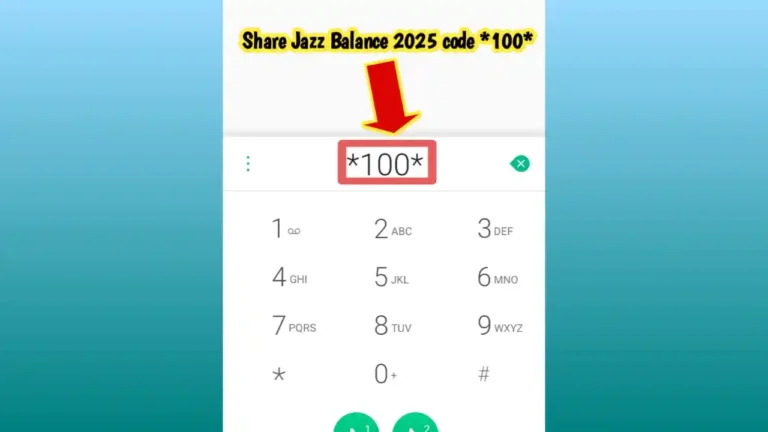
- Enter the balance share code: Start typing
*100*from your keypad.
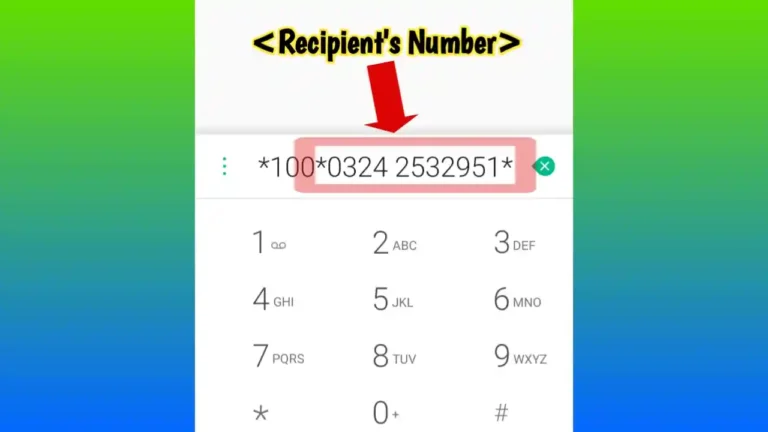
- Type the recipient’s number: Carefully enter the Jazz mobile number of the person who will receive the balance.
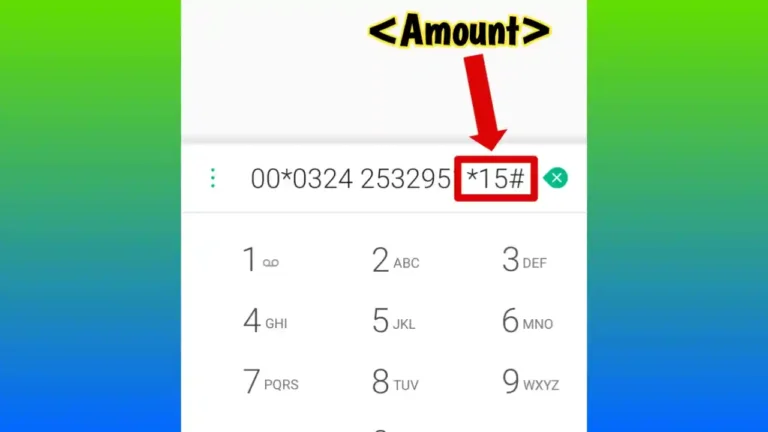
- Add the transfer amount: After the number, type
*Amount#and press the call button to proceed.
Complete Balance Share Format:
*100*<Receiver_Number>*<Amount>#
Example:
If you want to send Rs. 50 to 03001234567, simply dial:
*100*03001234567*50#
- Confirm the request: After dialing, you will receive a confirmation message on your screen.
- Reply with “1”: Send 1 to approve and finalize the balance transfer.
- SMS confirmation: Both sender and receiver will get a confirmation SMS once the transaction is successful.
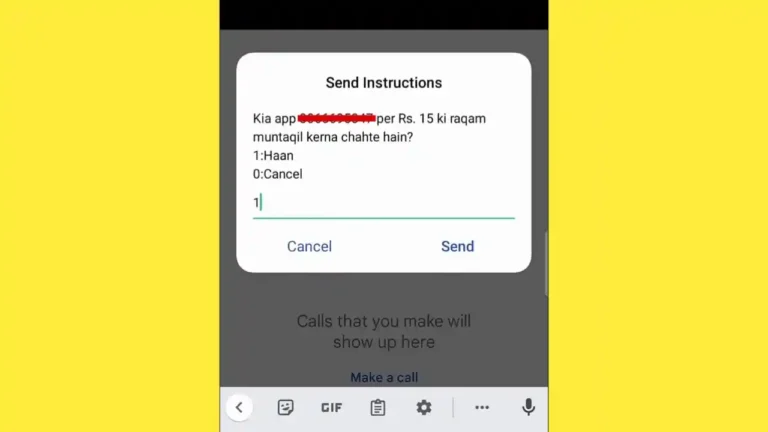
The balance transfer is processed instantly, allowing your loved ones to make calls, send SMS, or activate packages without delay. You can share balance starting from Rs. 15 up to Rs. 500 per transaction, depending on your available credit.
International Number Format (If Required):
If entering the number in international format, use:
*100*9230XXXXXXXX*Amount#
Jazz Balance Share is a convenient and reliable service for prepaid users, ensuring you can support friends and family anytime they run out of balance.
Jazz Balance Share Minimum Amount
Before sending credit to another number, it is important to understand the minimum transfer amount, maximum limits, and applicable service charges. Having clear knowledge of these details helps you avoid errors and unexpected deductions during the transaction.
The minimum amount you can transfer through Jazz Balance Share is Rs. 15, which means any amount below this limit cannot be sent. On every successful transfer, a service fee of Rs. 8.60 is deducted from the sender’s account, and this charge includes all applicable taxes. This fee applies to each transaction separately.
Quick Tip: The balance sharing facility is only available for Jazz prepaid customers. Before initiating a transfer, dial *111# (Rs. 0.12 plus tax) to check your remaining balance and ensure you have sufficient credit, including the service charges.
The transferred balance is delivered instantly to the recipient’s number. This makes the service extremely useful in emergency situations when someone urgently requires mobile credit for calls, SMS, or internet usage.
Jazz Balance Share Other Information
While using the Jazz balance sharing service, there are several important guidelines that you should remember to ensure a smooth transfer process.
After dialing the official sharing code, your screen will display a confirmation message containing the transaction details. To complete the process, you must reply with “1” to confirm the transfer. If you do not send this confirmation, the balance will not be transferred.
Each successful transaction deducts Rs. 8.60 from the sender’s account as a service charge, inclusive of taxes. Jazz does not take responsibility if you mistakenly send credit to the wrong number, so always double-check the recipient’s mobile number before confirming the transfer.
Both the sender and the receiver must be active Jazz prepaid users for this service to work. The balance share option is not available for postpaid connections, dongles, or Data SIMs.nsfers from happening.
Jazz Balance Share Request
Running out of balance at the wrong time can be frustrating, especially when you urgently need to make a call or use mobile internet. To solve this problem, Jazz provides a convenient Balance Request feature that allows you to ask friends or family members to send you credit when your balance is low. This service is particularly useful in emergency situations when you cannot recharge immediately.
Follow these steps to send a balance request:
- Dial *107# from your Jazz prepaid SIM.
- A menu will appear on your screen asking for details.
- Enter the Jazz mobile number of the person from whom you want to request balance, for example 03001234567.
- Send the request and wait for the other person to receive the notification and transfer balance using the *100# code.
Important Details:
- Sending a balance request is completely free for the requester.
- The sender who transfers the balance pays the Rs. 8.60 service charge (inclusive of taxes).
- You can send up to 5 balance requests per day to the same number.
This feature ensures that you are never left without credit during important moments and can quickly receive help when needed.
Jazz Balance Service Terms & Conditions
Before using the Jazz credit transfer service, it is important to understand the following terms and conditions to avoid any inconvenience.
- Both the sender and receiver must have active Jazz prepaid SIMs.
- This service is not available for Dongle connections or Data SIM users.
- A user can receive a maximum of 5 balance share requests in one day.
- The maximum amount allowed per transaction is Rs. 500.
- The total daily transfer limit is also Rs. 500.
- A service charge of Rs. 8.60 (including all taxes) applies to every successful transfer.
- Jazz reserves the right to modify or discontinue the service at any time, subject to PTA regulations.
General Terms & Conditions of Jazz Balance Service
When using the Jazz balance transfer facility, the following general conditions also apply. These terms operate alongside the standard SIM activation agreement accepted by every customer.
- Jazz may revise prices or withdraw services with prior notice.
- All mentioned charges are inclusive of applicable taxes across Pakistan.
- The SIM card remains the property of Jazz, and customers are granted usage rights only.
- For complaints or assistance, you can dial 111 or email customercare@jazz.com.pk.
- To report spam messages, forward the sender’s number, add a space, and type the message content, then send it to 9000.
- To block promotional SMS, send “ON” or “SUB” to 3627 free of cost.
Jazz also provides tax-related information for customers. The advance income tax rate is 15% on every recharge, as per applicable government regulations.rge. Sales tax in Islamabad is 16%. Sales tax across the rest of Pakistan and AJK is 19.5%. Gilgit-Baltistan has tax exemption.
How to Share Jazz Balance from Jazz Simosa World App
The Jazz Simosa World app does not currently offer a direct option to share balance with another Jazz number. However, it is still a powerful and useful application for managing your mobile account, checking remaining balance, and subscribing to packages. This official Jazz app provides multiple customer support and account management features in one place.
Here’s how you can use the Jazz Simosa World app for related services:
- Download the Jazz World app from the Google Play Store or Apple App Store and install it on your smartphone.
- Register with your active Jazz mobile number.
- Open the application and log in using the verification code sent to your number.
- Navigate to the “Balance” section to check your remaining credit and usage details.
- You can also recharge your number, activate bundles, and manage your active packages directly from the app.
Although the app does not support direct balance transfer, it remains very helpful for monitoring your account. For sharing balance, you should continue using the official *100# USSD code method.
How to Share Jazz Balance to JazzCash Account Online
Directly transferring Jazz mobile balance to a JazzCash account is not available in the standard way. However, there are alternative methods that allow you to use your mobile account funds for JazzCash transactions and online payments.
To begin, you need to link your Jazz mobile number with your JazzCash account. This connection makes financial transactions smoother and more convenient. Once your number is successfully linked, you can manage funds and perform various transactions using JazzCash services.
Even though you cannot directly share Jazz balance to JazzCash like a normal balance transfer, you can still use JazzCash for bill payments, online shopping, and sending money to others after loading funds into your wallet. Setting up JazzCash provides greater flexibility for handling your finances digitally.
Another method is through the JazzCash mobile application:
- Open the JazzCash app on your smartphone.
- Log in using your registered mobile number and PIN.
- Tap on the “Load Money” option available on the home screen.
- If the option “From Jazz Balance” appears, select it.
- Enter the desired amount and confirm the transaction.
JazzCash works as a separate financial platform designed for larger transactions and secure money transfers. By linking your Jazz number, you can convert eligible balance into JazzCash funds and use them for payments, transfers, and other financial activities conveniently. different transactions including bill payments, money transfers, and online purchases.
How Can I Share My Jazz Data Package?
Currently, Jazz does not provide a direct option to share your active data package, including MBs or GBs, with another Jazz user. This means you cannot transfer your remaining internet data from one SIM to another. However, there are a few practical alternatives you can use to help someone who needs internet access.
Here are the available options:
- Transfer balance using the *100# code so the other person can subscribe to their own data bundle.
- Use the Jazz World app to gift a data package by activating it directly on another Jazz number.
- If the person is nearby, turn on your mobile hotspot and share your internet connection with them.
To gift a data bundle through the Jazz World app, follow these steps:
- Open the Jazz World application on your smartphone.
- Go to the “Packages” section from the main menu.
- Select your preferred internet bundle.
- Enter the recipient’s Jazz mobile number.
- Confirm the subscription to activate the package on their number.
If Jazz introduces a dedicated data sharing feature in the future, it will most likely function in a similar way to the current Jazz balance transfer system, where confirmation and service charges may apply.
All SIM Balance Transfer Codes
In Pakistan, major telecom networks such as Jazz, Zong, Ufone, and Telenor offer balance sharing services for their prepaid customers. Each network provides its own specific USSD code and terms for transferring mobile credit. These services allow users to send balance quickly during emergencies.
Important Note: In most cases, the transferred balance expires within 3 days and is usually valid for local calls and SMS only. Always recheck the recipient’s number carefully before confirming the transaction to avoid sending credit to the wrong person.
It is also important to remember that balance sharing works only when both the sender and receiver are prepaid customers of the same network. Cross-network transfers are not supported directly.
How to Transfer Balance from Jazz to Zong
You cannot transfer balance directly from Jazz to Zong. The Jazz balance sharing system works strictly between Jazz prepaid numbers only. At present, no telecom operator in Pakistan supports direct cross-network credit transfers.
However, you can use the following alternatives:
- Send money through JazzCash or EasyPaisa to the recipient’s mobile wallet or bank account so they can recharge their Zong number.
- Use online recharge platforms or banking apps that allow you to top up any network.
- Purchase a physical recharge card or visit a retailer to load balance on their Zong SIM.
Jazz Balance Share Code to Ufone
Direct balance transfer from Jazz to Ufone is also not possible. The Jazz balance share feature is limited to Jazz-to-Jazz prepaid transfers only.
If you need to help someone using a Ufone number, consider these options:
- Transfer money through JazzCash or EasyPaisa so they can withdraw or use it for recharge.
- Use online recharge websites or mobile banking apps that support Ufone top-ups.
- Buy a Ufone load card or visit a nearby retailer for recharge assistance.
Jazz Balance Share Code to Telenor
Similar to Zong and Ufone, Jazz does not allow direct balance sharing to Telenor numbers. The service remains restricted to Jazz prepaid users only.
To assist someone using a Telenor SIM, you can:
- Send funds via JazzCash or other mobile wallet services.
- Use digital recharge platforms that support multiple networks.
- Purchase Telenor balance from a retail shop on their behalf.
Extra Tips for Jazz Balance Management
Managing your Jazz balance effectively ensures you stay connected without interruptions or unexpected charges. Regular monitoring of your credit, knowing available packages, and using the right apps can make your mobile experience smoother and more cost-effective. By developing simple habits, you can maximize the benefits of your Jazz connection and avoid running out of balance during important moments.
- Keep track of your remaining balance by dialing *111# to stay updated on your current credit.
- Use the Jazz World app to manage your account, recharge, and discover exclusive offers.
- Activate balance save mode by dialing *275# to prevent accidental data charges (turn it off anytime with *2754#).
- Explore various call, SMS, and data bundles to save money while staying connected.
- Set up auto-recharge through the Jazz World app so your account is topped up automatically.
- Monitor your data usage by dialing *176# to avoid running out unexpectedly.
- Subscribe to balance alert notifications to get warnings when your credit is low.
By following these simple steps, you can make balance management effortless, stay connected at all times, and enjoy all the features Jazz offers.
Conclusion
Jazz balance sharing is a reliable way to assist friends and family in staying connected. Using How to Share Jazz Balance 2026 instructions and the simple code format 100Number*Amount#, you can quickly Share Jazz Balance with anyone on the Jazz network. Transfers range from Rs. 15 to Rs. 500, and each transaction carries a service charge of Rs. 8.60.
Whether helping someone in need or managing shared mobile expenses, Jazz balance sharing makes it quick, easy, and convenient. Following the right steps ensures you stay connected and get the most out of your Jazz services. needs help or splitting mobile expenses, sending Jazz balance has become incredibly simple. Stay connected with the people you care about and take full advantage of Jazz’s smooth balance-sharing features!
FAQs
How to share balance with code?
To share balance, dial 100 followed by the recipient’s mobile number, then add the amount and press the hash key. For example, type 10003001234567*50# and press call. You’ll get a confirmation message asking you to reply with “1” to complete the transfer. Each transaction charges Rs. 8.60 as a service fee.
Can I transfer my SIM balance to another number?
Yes, you can transfer your balance to another Jazz prepaid number by using the 100 code method. However, transferring balance across different networks isn’t possible with this service.
How to check Jazz balance code?
To check your current Jazz balance, simply dial *111# from your Jazz connection. This service costs Rs. 0.12 plus applicable tax per inquiry.
What is Jazz code 100?
Code 100 is the USSD code that Jazz prepaid customers use to share balance with other Jazz users. The complete format is 100Number*Amount# where you replace Number with the recipient’s mobile number and Amount with how much you want to send.
What is the minimum Jazz load share?
The minimum amount you can share per transaction is Rs. 15. You cannot send any amount lower than this through the Jazz balance share service.
Can we send balance to JazzCash?
No, you cannot directly send mobile balance to a JazzCash account. Instead, use JazzCash’s “Send Money” feature for mobile wallet or bank transfers.
What’s the maximum balance I can share?
The maximum amount you can transfer in a single transaction is Rs. 500. Your daily transfer limit also remains at Rs. 500.
Is requesting balance free?
Yes, requesting balance using *107# is completely free for the person making the request. The person who sends the balance pays the Rs. 8.60 service charge.
Can postpaid users share balance?
No, this service works only for Jazz prepaid customers. Postpaid users cannot use the balance sharing feature.
How long does shared balance last?
Transferred balance expires after 3 days. The shared credit is valid only for local calls and SMS during this period.
Can I share balance via Jazz World?
No, the Jazz World app doesn’t support balance sharing. You must use the 100 USSD code to share balance. The app is useful for managing your balance and mobile packages.
What if I share to the wrong number?
Jazz doesn’t accept responsibility for transfers made to incorrect numbers. Always carefully verify the recipient’s mobile number before confirming your transaction.
How many balance requests can I send?
You can send up to 5 balance requests daily to the same person using the *107# code.
Can I share Jazz data directly?
No, Jazz doesn’t allow direct data sharing. However, you can share balance so the recipient buys their own data, or you can gift data packages through the Jazz World app.
How do I contact Jazz support?
For support, send an email to customercare@jazz.com.pk or dial 111 from your Jazz number to speak with customer service.
Will I receive a confirmation after sharing balance?
Yes, both the sender and receiver will receive SMS confirmation messages once the balance transfer completes successfully.
Can I cancel a balance transfer after it’s confirmed?
No, once you confirm the transaction by replying with “1”, you cannot reverse or cancel it.
Is there a charge for checking my balance?
Yes, checking your balance using *111# costs Rs. 0.12 plus applicable tax each time you check.
Can I share balance with a Warid number?
Yes, since Jazz and Warid networks merged together, you can use the same 100 code to share balance with Warid numbers.
Do I need to activate any service to share balance?
No, all Jazz prepaid customers can use the balance sharing feature automatically. No activation is required.